$ dok health
Containers with a healthcheck: status, failing streak, last probe
Synopsis
dok health [OPTIONS]Description
Only the containers that declare a healthcheck, unhealthy first. For each one: the status, the failing streak, the probe interval, and the exit code and first line of the last probe's output. That last line is usually the reason a check fails, and docker inspect buries it.
The summary counts containers without a healthcheck too, so an empty table and a table missing half the stack do not look the same. dok issues one inspect per container to read the probe log.
Options
-a, --all- Include stopped containers
-u, --unhealthy- Only checks that are failing
Every command also takes the global options: --json, --color, --icons and --theme.
Examples
$ dok health # every container with a healthcheck$ dok health -u # only the failing onesOutput
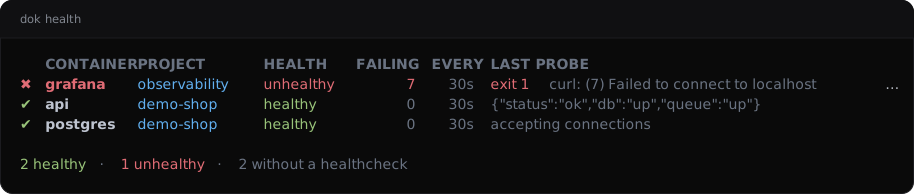
dok health --demo, dok’s built-in example stack.JSON output
$ dok health --json
{
  "checks": [
    {
      "container": "grafana",
      "failing_streak": 7,
      "interval_seconds": 30,
      "last_probe": {
        "exit_code": 1,
        "output": "curl: (7) Failed to connect to localhost port 3000"
      },
      "project": "observability",
      "status": "unhealthy"
    },
    {
      "container": "api",
      "failing_streak": 0,
      "interval_seconds": 30,
      "last_probe": {
        "exit_code": 0,
        "output": "{\"status\":\"ok\",\"db\":\"up\",\"queue\":\"up\"}"
      },
      "project": "demo-shop",
      "status": "healthy"
    }
  ],
  "summary": {
    "containers": 5,
    "with_healthcheck": 3,
    "without_healthcheck": 2
  }
}
Longer arrays are cut to their first two elements here.
See also
dok-ps(1), dok-inspect(1), dok-events(1), dok(7)
dok 0.3.02026-09-27DOK-HEALTH(1)