$ dok logs
Tail logs from one or more containers with level colouring
Synopsis
dok logs [OPTIONS] [CONTAINERS]...Description
Interleaves the logs of several containers, each in a stable colour. The separator turns red for stderr, and JSON log lines are expanded into level, message and key=value pairs.
With no container named, dok tails every running container.
Arguments
[CONTAINERS]...- Container names or ids; omit to tail every running container
Options
-f, --follow- Keep streaming
-n, --tail <TAIL>- Lines of history per container
-t, --timestamps- Show container timestamps
-g, --grep <GREP>- Only lines containing this substring
Every command also takes the global options: --json, --color, --icons and --theme.
Examples
$ dok logs # every running container$ dok logs api db -f # follow two of them$ dok logs api -n 200 -t # 200 lines with timestamps$ dok logs api -g error # only matching linesOutput
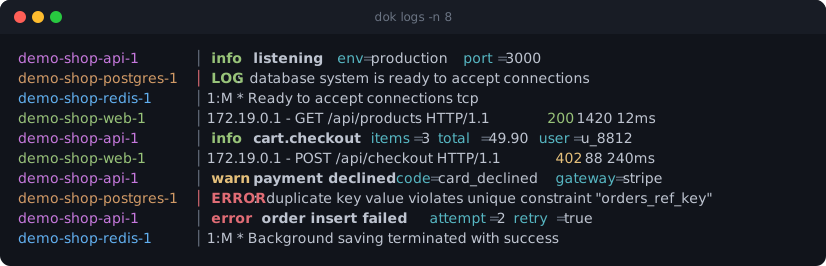
dok logs --demo, dok’s built-in example stack.JSON output
$ dok logs -n 4 --json
{"container": "demo-shop-api-1", "message": "{\"level\":\"info\",\"msg\":\"listening\",\"port\":3000,\"env\":\"production\"}", "stream": "stdout", "timestamp": "2026-09-27T09:56:20.340Z"}
{"container": "demo-shop-postgres-1", "message": "LOG:  database system is ready to accept connections", "stream": "stderr", "timestamp": "2026-09-27T09:56:27.340Z"}
NDJSON: one object per line, flushed as it arrives. First two lines shown.
See also
dok-events(1), dok-ps(1), dok(7)
dok 0.3.02026-09-27DOK-LOGS(1)