$ dok prune
What docker system prune would remove. Never removes anything
Synopsis
dok prune [OPTIONS]Description
Shows what docker system prune would remove, grouped by kind and sized, then prints the docker command that does it. dok never removes anything, and there is no flag that makes it.
It draws the same line docker draws: dangling images by default, every unused image with -a, unused volumes only with --volumes. The built-in bridge, host and none networks are never listed, because docker refuses to remove them.
Options
-a, --all- Count every unused image, not only dangling ones (docker's -a)
--volumes- Include unused volumes (docker's --volumes)
Every command also takes the global options: --json, --color, --icons and --theme.
Examples
$ dok prune # what docker system prune would take$ dok prune -a # count every unused image$ dok prune -a --volumes # and unused volumesOutput
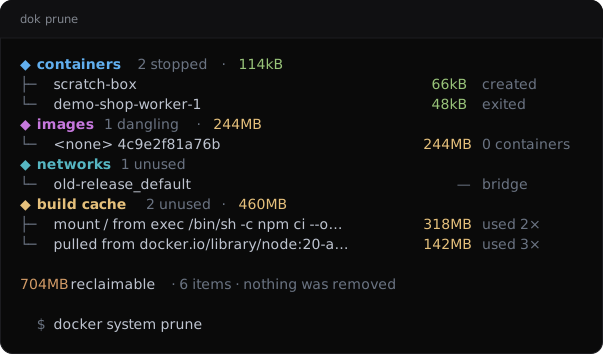
dok prune --demo, dok’s built-in example stack.JSON output
$ dok prune --json
{
  "command": "docker system prune",
  "count": 6,
  "groups": [
    {
      "count": 2,
      "items": [
        {
          "name": "demo-shop-worker-1",
          "note": "exited",
          "size": {
            "bytes": 48000,
            "human": "48kB"
          }
        },
        {
          "name": "scratch-box",
          "note": "created",
          "size": {
            "bytes": 66000,
            "human": "66kB"
          }
        }
      ],
      "kind": "containers",
      "reason": "stopped",
      "size": {
        "bytes": 114000,
        "human": "114kB"
      }
    },
    {
      "count": 1,
      "items": [
        {
          "name": "<none> 4c9e2f81a76b",
          "note": "0 containers",
          "size": {
            "bytes": 244000000,
            "human": "244MB"
          }
        }
      ],
      "kind": "images",
      "reason": "dangling",
      "size": {
        "bytes": 244000000,
        "human": "244MB"
      }
    }
  ],
  "removed": false,
  "total": {
    "bytes": 704114000,
    "human": "704MB"
  }
}
Longer arrays are cut to their first two elements here.
See also
dok-df(1), dok-images(1), dok(7)
dok 0.3.02026-09-27DOK-PRUNE(1)