$ dok top
Processes running inside containers, as a tree
Synopsis
dok top [OPTIONS] [CONTAINERS]...Description
The processes inside each container, nested under their parent PID so a process tree reads as one.
--ps-args passes arguments to ps inside the container, and the column titles follow whatever it asks for. --flat drops the nesting.
Arguments
[CONTAINERS]...- Containers to inspect; omit for every running container
Options
--ps-args <PS_ARGS>- Arguments passed to ps inside the container
--flat- Do not nest child processes under their parent
Every command also takes the global options: --json, --color, --icons and --theme.
Examples
$ dok top # every running container$ dok top api # one container$ dok top api --ps-args "-eo pid,ppid,rss,args" # choose the columnsOutput
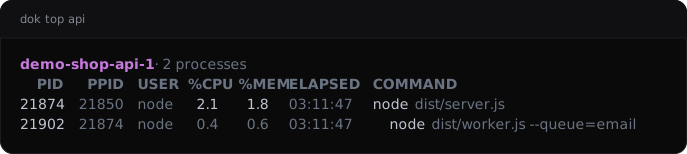
dok top --demo, dok’s built-in example stack.JSON output
$ dok top api --json
{
  "containers": [
    {
      "container": "demo-shop-api-1",
      "processes": [
        {
          "%cpu": "2.1",
          "%mem": "1.8",
          "command": "node dist/server.js",
          "elapsed": "03:11:47",
          "pid": "21874",
          "ppid": "21850",
          "user": "node"
        },
        {
          "%cpu": "0.4",
          "%mem": "0.6",
          "command": "node dist/worker.js --queue=email",
          "elapsed": "03:11:47",
          "pid": "21902",
          "ppid": "21874",
          "user": "node"
        }
      ],
      "titles": [
        "PID",
        "PPID",
        "USER",
        "%CPU",
        "%MEM",
        "ELAPSED",
        "COMMAND"
      ]
    }
  ]
}
See also
dok-inspect(1), dok-stats(1), dok(7)
dok 0.3.02026-09-27DOK-TOP(1)