$ dok history
Layers of an image with size bars and readable instructions
Synopsis
dok history [OPTIONS] <IMAGE>Description
The layers of an image in build order, read top-down the way the Dockerfile was written, each with a bar showing its share of the image. Layers over 10% of the total are marked.
Instructions are recovered from the classic builder's /bin/sh -c #(nop) wrapper and from BuildKit's direct form alike, and a multi-line RUN collapses onto one row. -r restores docker's newest-first order.
Arguments
<IMAGE>- Image name, repo:tag or id prefix
Options
-r, --reverse- Newest layer first, the way
docker historyprints it --no-trunc- Do not shorten long instructions
Every command also takes the global options: --json, --color, --icons and --theme.
Examples
$ dok history api # resolves a bare repo to any of its tags$ dok history api -r # newest layer first$ dok history postgres:16-alpine --no-trunc # keep long instructions wholeOutput
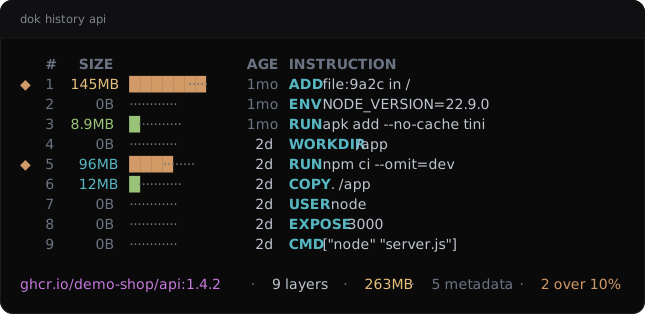
dok history --demo, dok’s built-in example stack.JSON output
$ dok history api --json
{
  "count": 9,
  "image": "ghcr.io/demo-shop/api:1.4.2",
  "layers": [
    {
      "created": {
        "age_human": "1mo",
        "age_seconds": 2592000,
        "created": 1787911050
      },
      "fat": true,
      "id": "sha256:9f8e7d6c5b4a",
      "index": 1,
      "instruction": "ADD file:9a2c in /",
      "share": 0.5525,
      "size": {
        "bytes": 145200000,
        "human": "145MB"
      }
    },
    {
      "created": {
        "age_human": "1mo",
        "age_seconds": 2592000,
        "created": 1787911050
      },
      "fat": false,
      "id": "<missing>",
      "index": 2,
      "instruction": "ENV NODE_VERSION=22.9.0",
      "share": 0.0,
      "size": {
        "bytes": 0,
        "human": "0B"
      }
    }
  ],
  "total": {
    "bytes": 262800000,
    "human": "263MB"
  }
}
Longer arrays are cut to their first two elements here.
See also
dok-images(1), dok-df(1), dok(7)
dok 0.3.02026-09-27DOK-HISTORY(1)