$ dok ports
Every published port in one table, sorted by port
Synopsis
dok ports [OPTIONS]Description
One row per published binding, sorted by host port, so finding the owner of a port is a glance or a grep.
Exposed-but-unpublished ports are skipped, since nothing on the host can reach them. A wildcard binding that Docker reports twice, as 0.0.0.0 and ::, collapses into one row. The BIND column appears only when some binding is narrower than every interface. When two containers claim the same address, port and protocol, both rows are marked.
Options
-a, --all- Include stopped containers
Every command also takes the global options: --json, --color, --icons and --theme.
Examples
$ dok ports # every published port$ dok ports -a # include stopped containers$ dok ports | grep 5432 # who owns 5432Output
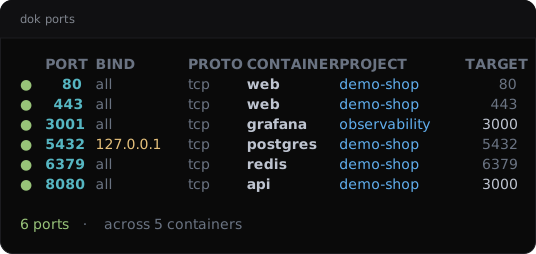
dok ports --demo, dok’s built-in example stack.JSON output
$ dok ports --json
{
  "ports": [
    {
      "conflict": false,
      "container": "web",
      "container_port": 80,
      "host_ip": null,
      "host_port": 80,
      "project": "demo-shop",
      "protocol": "tcp",
      "state": "running"
    },
    {
      "conflict": false,
      "container": "web",
      "container_port": 443,
      "host_ip": null,
      "host_port": 443,
      "project": "demo-shop",
      "protocol": "tcp",
      "state": "running"
    }
  ]
}
Longer arrays are cut to their first two elements here.
See also
dok-ps(1), dok-tree(1), dok(7)
dok 0.3.02026-09-27DOK-PORTS(1)