$ dok themes
List or preview themes
Synopsis
dok themes [OPTIONS]Description
Lists the built-in themes and any defined in the config file, each with a row of swatches. A theme carries a palette of nine colour roles, a glyph set and a layout, so the ascii theme stays pure ASCII for CI logs and serial consoles.
--preview renders a sample table in every theme. --init writes a starter config to ~/.config/dok/config.toml.
Options
-p, --preview- Render a full sample of every theme
--init- Write a starter config file to ~/.config/dok/config.toml
Every command also takes the global options: --json, --color, --icons and --theme.
Examples
$ dok themes # list with swatches$ dok themes --preview # a sample table in each$ dok ps --theme gruvbox # use one for a single commandOutput
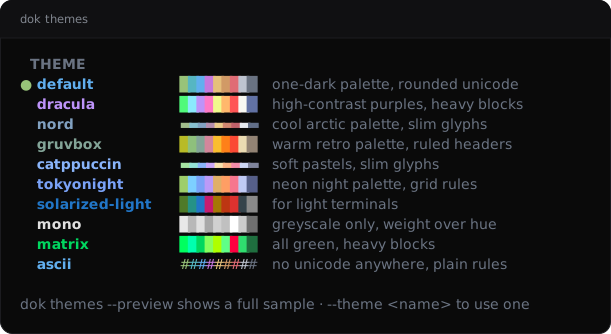
dok themes --demo, dok’s built-in example stack.JSON output
$ dok themes --json
{
  "active": "default",
  "themes": [
    {
      "active": true,
      "description": "one-dark palette, rounded unicode",
      "name": "default",
      "palette": {
        "blue": "#61afef",
        "cyan": "#56b6c2",
        "fg": "#bec4d0",
        "gray": "#6a7382",
        "green": "#98c379",
        "magenta": "#c678dd",
        "orange": "#d19a66",
        "red": "#e06c75",
        "yellow": "#e5c07b"
      }
    },
    {
      "active": false,
      "description": "high-contrast purples, heavy blocks",
      "name": "dracula",
      "palette": {
        "blue": "#bd93f9",
        "cyan": "#8be9fd",
        "fg": "#f8f8f2",
        "gray": "#6272a4",
        "green": "#50fa7b",
        "magenta": "#ff79c6",
        "orange": "#ffb86c",
        "red": "#ff5555",
        "yellow": "#f1fa8c"
      }
    }
  ]
}
Longer arrays are cut to their first two elements here.
See also
dok 0.3.02026-09-27DOK-THEMES(1)