$ dok images
List images with size and age gradients
Synopsis
dok images [OPTIONS]Description
Images sorted by size, with size and age gradients. There is one row per tag, so an image carrying two tags appears twice; the total counts unique image ids so it agrees with docker system df.
Dangling images are marked reclaimable, and the last column counts the containers using each image.
Options
-a, --all- Include intermediate layers
--dangling- Only dangling (<none>) images
-s, --sort <SORT>- Sort key
Every command also takes the global options: --json, --color, --icons and --theme.
Examples
$ dok images # biggest first$ dok images -s age # newest first$ dok images --dangling # only untagged imagesOutput
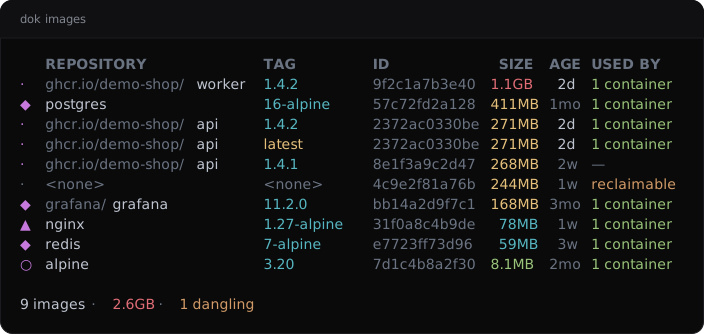
dok images --demo, dok’s built-in example stack.JSON output
$ dok images --json
{
  "images": [
    {
      "containers": 1,
      "created": {
        "age_human": "2d",
        "age_seconds": 172800,
        "created": 1790330250
      },
      "dangling": false,
      "id": "sha256:9f2c1a7b3e40",
      "repository": "ghcr.io/demo-shop/worker",
      "shared_size": {
        "bytes": 142000000,
        "human": "142MB"
      },
      "short_id": "9f2c1a7b3e40",
      "size": {
        "bytes": 1140000000,
        "human": "1.1GB"
      },
      "tag": "1.4.2"
    },
    {
      "containers": 1,
      "created": {
        "age_human": "1mo",
        "age_seconds": 2764800,
        "created": 1787738250
      },
      "dangling": false,
      "id": "sha256:57c72fd2a128",
      "repository": "postgres",
      "shared_size": {
        "bytes": 0,
        "human": "0B"
      },
      "short_id": "57c72fd2a128",
      "size": {
        "bytes": 411000000,
        "human": "411MB"
      },
      "tag": "16-alpine"
    }
  ]
}
Longer arrays are cut to their first two elements here.
See also
dok-history(1), dok-df(1), dok-prune(1), dok(7)
dok 0.3.02026-09-27DOK-IMAGES(1)